This is the simple way that allows you to change Wc3 resolution on Mac OS X.
This is will allow you to run Warcraft 3 in wide resolution.

Read More...
 |
This is the simple way that allows you to change Wc3 resolution on Mac OS X.
This is will allow you to run Warcraft 3 in wide resolution.
This is an application designed to automatically refresh the game you are currently hosting. Normally when you host a game, you would close all slots and open them to force your game to appear at the top of Battle.net's list of custom games. With this application, that process is done automatically.
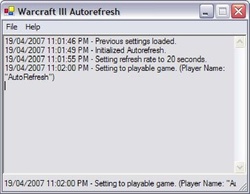
Here is a tutorial how to use Warcraft 3 Autorefresher For Mac OS X.
1.Download Warcraft 3 Autorefresher For Mac OS X and extract it somewhere.
2.Start Warcraft 3 and host a game.
4.Go into window-mode by pressing Command and M
5.Open a terminal, press Command and Space. Type in Terminal.
6.A black window should appear.
7.Drag the ar.py into the Terminal
8.Press return
Tutorial by LINCOLNQ, edited by hendricius


