Sep 13, 2009

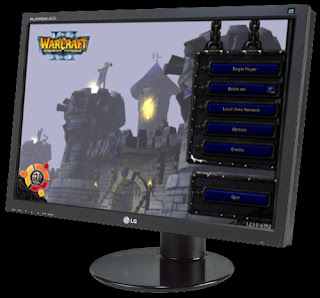
Running Warcraft 3 in Widescreen in Linux/Ubuntu

For Windows users there is WC3 Resolution Changer V0.1b but this tool don't work in Linux (using wine).
So You need to change Warcraft 3 resolution manual.


Open terminal (accessories > terminal, in ubuntu)
Type regedit

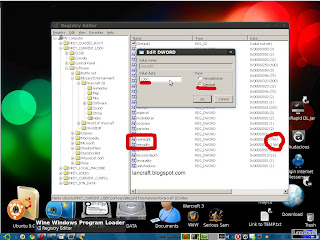
Regedit will open, in regedit locate:

HKEY_CURRENT_USER > Software > Blizzard Entertainment > Warcraft III > Video

Find resheight > duble click > change base to decimal > in value data add height resolution

Find reswidth > duble click > change base to decimal > in value data add width resolution


Read More...

Sep 5, 2009

How to Run Warcraft 3 on Intel GMA X3100 or other integrated GPUs

Warcraft 3 work slow on X3100 and some other integrated GPUs.
That is because game is trying to use T&L which is very bad implemented in X3100 GPUs


To resolve this problem You need to add -swtnl parameter in target field of shortcut.

It shod look something like this:

"C:\Prog​ram Files\Warcraft III\Frozen Throne.exe" -swtnl


In some integrated GPUs Warcraft have problems with DirectX (Direct3D) so You need to run Warcraft 3 in OpenGL mode.

To do this add -opengl parameter in target field of shortcut.

When You add both parameters it shod look something like this:

"C:\Prog​ram Files\Warcraft III\Frozen Throne.exe" -opengl -swtnl

Read More...

Sep 3, 2009

DotA Allstars 6.62 AI 0.21 Released! - Download

First release, updated to 6.62 and 1.24 compliant. Note that this is v0.21, and there will be bugs.
Some abilities are not working for bots yet (they learn them but don't use them), and this is expected and will be addressed in future versions.

The following game modes have been disabled for now:
-vr, -rv, -rd, -cd, -cm, -lm, -xl

The following game commands have been disabled for now:
-afk, -kickafk, -ah, -switch, -fun

Please report bugs to Buffmeplz.

Things that are bugs:
-Crashes with reproducible reasons
-Abilities/items not working as expected (for players or bots)

Things that are not bugs:
-Bots not using certain abilities
-Bots being too strong/weak/cheating. They do that.


Download DotA Allstars 6.62 AI 0.21 (via rapidshare.com)
Download DotA Allstars 6.62 AI 0.21 (via uploaded.to)

Read More...

Dota-Allstars 6.62b Official Map - Download

New version of DotA has been released. New version has been released because exploit in DotA 6.62 map, check video below to see exploit.

Changelogs:

Fixed a major exploit that was recently discovered


Download Dota-Allstars 6.62b Official (via uploading.com)
Download Dota-Allstars 6.62b Official (via uploaded.to)

Read More...

Sep 1, 2009

Warcraft 3 Background Changer + Windows and Linux/Ubuntu Tutorial

Warcraft 3 Background Changer allows You to change background in Warcraft 3 RoC and TFT.

You can chose 5 background themes from Warcraft III: Reign of Chaos and 5 themes from Warcraft III: Frozen Throne and + 2 beta themes, black and no-logo theme.


  • Instructions 

    • Windows
    1. Download and extract archive to Your Warcraft 3 directory (C:\Program Files\Warcraft III).
    2. Start RuTheme.exe and select which theme You want.
    3. If You get MSCOMCTL.OCX error, in archive there is MSCOMCTL.OCX and copy it to system32 (c:\Windows\system32\).
    According to your Operating System, type the following command to register this library file:

    Windows 95, 98, or Me:
    regsvr32 \windows\system\MSCOMCTL.OCX 
    Windows NT or 2000:
    regsvr32 \WINNT\system32\MSCOMCTL.OCX 
    Windows XP:
    regsvr32 \windows\system32\MSCOMCTL.OCX 
    You should see a message saying "DllRegisterServer ... succeeded"


    Vista/7 Users:
    Heres how to make it work on VISTA just right click RU Theme.exe then click properties choose Compatibility Tab then check Run this program in Compatibility mode for Windows Xp service pack 2 and also add
    check on Priviledge level run this program as administrator then apply ok then allow then try again. make sure Warcraft III is not running when your doing this.


  • Linux/Ubuntu
    1. Download and extract archive to Your Warcraft 3 directory (/home/USERNAME/.wine/dosdevices/c:/Program Files/Warcraft III).
    2. Start RuTheme.exe (right click > Open With "Wine Windows Program Loader") and select which theme You want.
    3. If You get MSCOMCTL.OCX error, in archive there is MSCOMCTL.OCX and copy it to system32 (/home/USERNAME/.wine/dosdevices/c:/windows/system32).

    Download Warcraft 3 Background Changer

    Read More...

    Lancraft © 2008-2013.
    Online Users